
October 17, 2026
Character Counter with Spaces: Optimize Social Posts, Meta Tags & Microcopy
In digital marketing, web publishing, and interface design, words are rarely infinite. Every platform you publish on operates under rigid spatial constraints. Whether you are fine-tuning a Google Ads headline, preventing an SEO title tag from getting truncated with an awkward ellipsis, or fitting a punchy hook into a 280-character tweet, a character counter with spaces is an indispensable precision tool.
Many writers mistakenly check character counts without spaces, only to discover their submission fails validation or gets cut off mid-sentence. Spaces are not empty nothingness; to database systems, display engines, and communication protocols, every single space represents an encoded byte. In this guide, we unpack why spaces matter, outline the strict character boundaries across major networks, and explore best practices for microcopy optimization.
Why Spaces Count: The Technical Reality
When you press the spacebar on your keyboard, your computer registers an ASCII 32 character (or in UTF-8, hex 0x20). In web forms, database storage tables, and SMS transmission packets, spaces consume real memory and display width.
Using a character counter with spaces ensures that what you draft in your editor matches the exact length parsed by the receiving server. This distinction is critical across multiple real-world scenarios:
- Google Search Engine Results Pages (SERPs): Google typically displays up to 600 pixels of title text (around 55–60 characters with spaces) and roughly 960 pixels on desktop for meta descriptions (150–160 characters with spaces). Exceeding these limits causes Google to truncate your carefully written copy.
- SMS Marketing (GSM-7 Protocol): A single standard SMS text message is limited to exactly 160 characters with spaces. If your message reaches 161 characters, telecom carriers split it into two separate messages, doubling your campaign costs immediately.
- Social Media Boundaries: Twitter/X enforces a hard cap of 280 characters with spaces for standard accounts. Instagram limits bios to 150 characters with spaces.
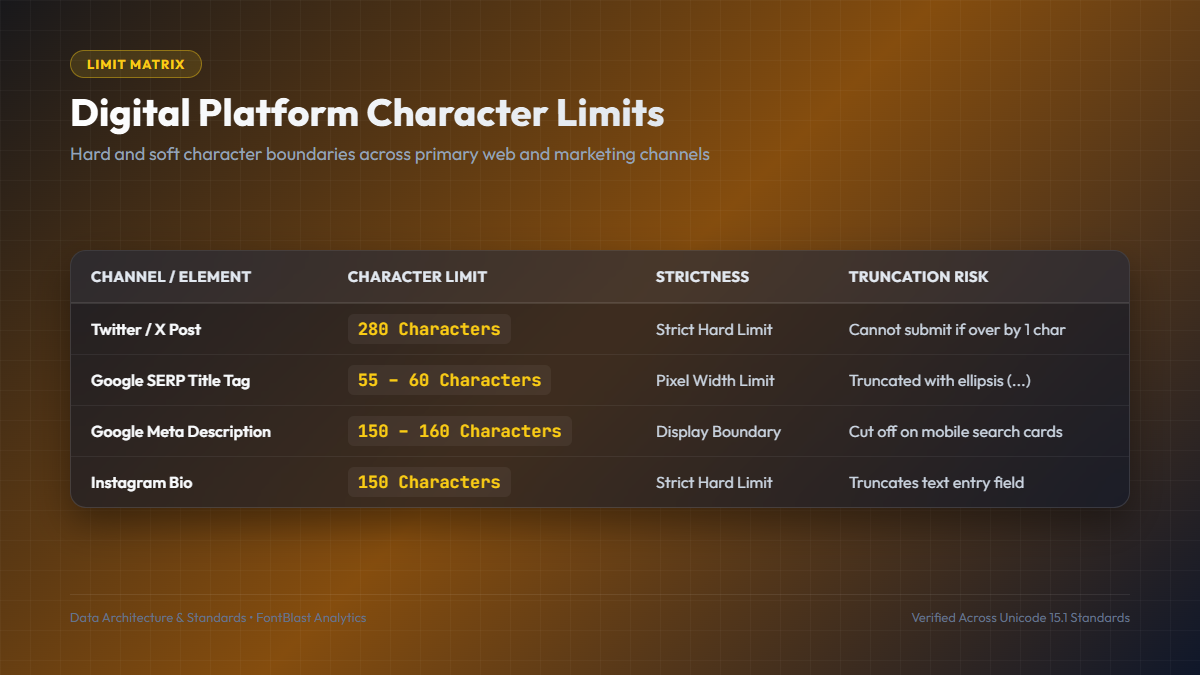
Platform Character Limit Matrix
Keep these standard industry benchmarks bookmarked when drafting marketing copy:
| Platform / Format | Character Limit (With Spaces) | Optimization Goal |
|---|---|---|
| Google Title Tag | 50 – 60 characters | Display complete brand and primary search keyword without truncation |
| Google Meta Description | 140 – 160 characters | Present an enticing summary and clear call to action on search cards |
| Twitter / X Posts | 280 characters | Craft sharp, standalone thoughts with space left for links or tags |
| Instagram Bio | 150 characters | Concise value proposition, niche description, and external link pointer |
| Google Ads Headline | 30 characters | High-converting value proposition that matches searcher query |
Best Practices for Writing Under Strict Limits
"Brevity is the soul of wit. Writing within a strict character limit is not a limitation; it is an exercise in conceptual clarity."
When drafting copy under tight constraints, apply these editorial techniques:
- Prioritize Front-Loaded Keywords: In SEO title tags and social hooks, put your most important keyword in the first 25 characters so readers and crawlers see it immediately.
- Watch Out for Emojis and Special Characters: While emojis count as one or two visual characters to the user, certain Unicode symbols and multi-byte emojis occupy up to 4 bytes in database encodings. Always verify your live count in a dedicated tool.
- Avoid Double Spaces: Accidental double spaces between sentences silently consume valuable character quota. Clean them with an automated trimmer.
- Check Both Desktop and Mobile Previews: Mobile viewports have narrower pixel boundaries than desktop monitors. Testing both ensures your text renders cleanly without unexpected line breaks.
Frequently Asked Questions About Character Counting
Does Google count characters or pixel width?
Google calculates title truncation based on container pixel width (typically 600px). Because wide letters like 'W' and 'M' take more pixels than narrow letters like 'i' and 'l', staying between 50 and 60 characters with spaces is the safest universal threshold.
How does Twitter calculate URL lengths?
Regardless of how long your original web link is, Twitter/X automatically wraps all URLs with its internal t.co link shortener, counting every link as exactly 23 characters with spaces.
Pair your character precision with eye-catching fonts from our Social Fonts Generator and study high-impact web typefaces in our Free Fonts Directory.