
September 6, 2026
Fonts for WhatsApp: How to Change and Style Your WhatsApp Text
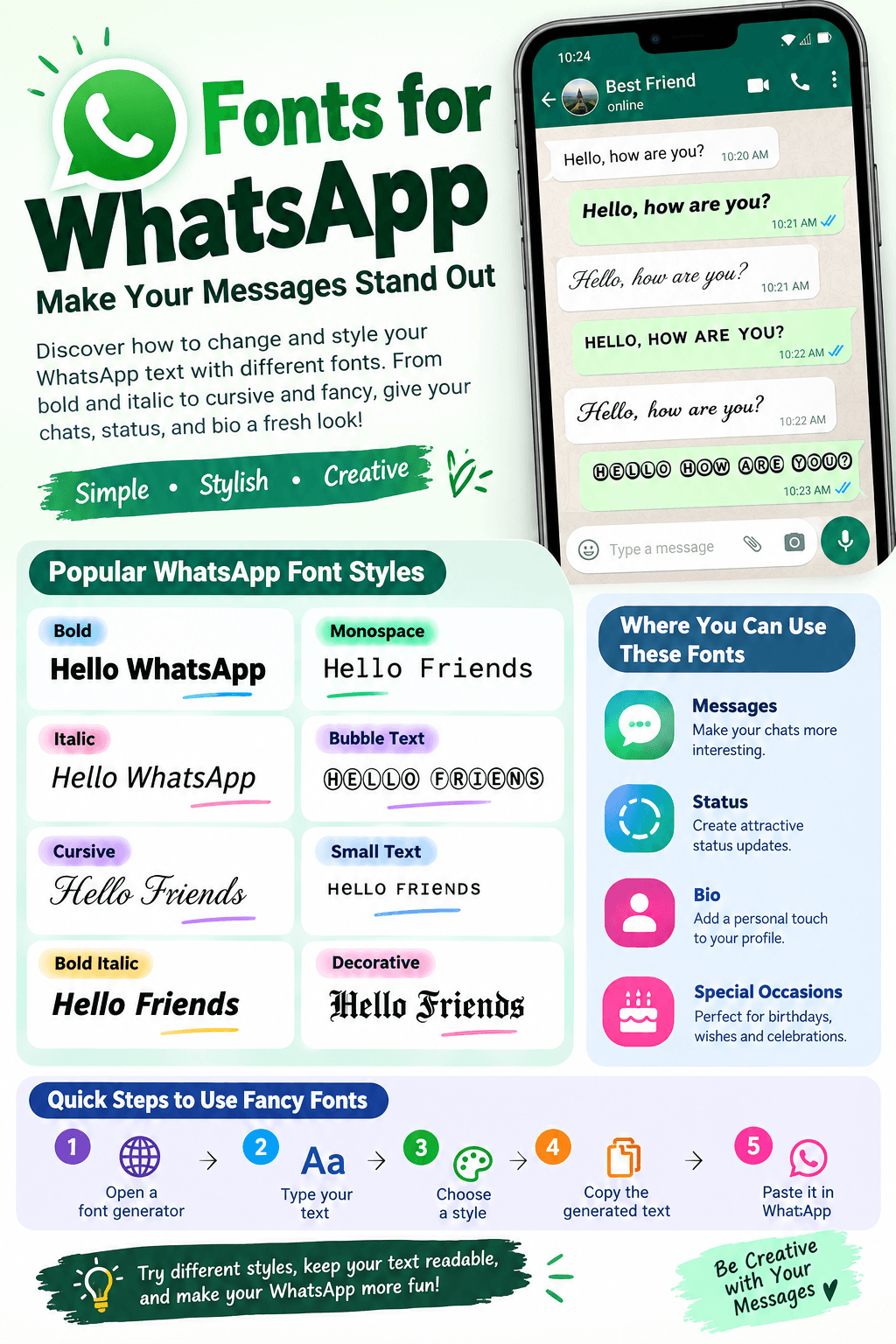
WhatsApp is one of the most popular messaging apps in the world, with billions of people using it to chat, share photos, send videos, and stay connected. While WhatsApp uses a standard font for normal messages, you can make your messages more interesting by using different text styles and fancy fonts.
Fonts for WhatsApp can help you create bold messages, stylish status updates, creative profile descriptions, and eye catching captions. You do not always need to install a complicated app. Many online font generators can create stylish text that you can simply copy and paste into WhatsApp.
In this guide, you will learn how WhatsApp fonts work, how to create fancy text, and how to use different font styles in your messages and status updates.
What Are Fonts for WhatsApp?
Fonts for WhatsApp are different text styles that you can use when chatting or posting on WhatsApp. Some styles are built directly into WhatsApp, while others are created using Unicode characters.
For example, a normal message may look like:
Hello, how are you?
A stylish version could look like:
𝓗𝓮𝓵𝓵𝓸, 𝓱𝓸𝔀 𝓪𝓻𝓮 𝔂𝓸𝓾?
Another style could look like:
𝙃𝙚𝙡𝙡𝙤, 𝙝𝙤𝙬 𝙖𝙧𝙚 𝙮𝙤𝙪?
These characters can usually be copied and pasted into WhatsApp.
How to Change Font Style on WhatsApp
WhatsApp has built in formatting options that allow you to change the appearance of your text.
You can use:
- Bold
- Italic
StrikethroughMonospace
To create bold text, place an asterisk before and after your text.
Example:
*Hello*
It will appear as:
Hello
For italic text, use underscores.
_Hello_
For strikethrough text, use tilde symbols.
~Hello~
WhatsApp also supports monospace text using three backticks.
```Hello```
These simple options are useful when you want to highlight important words or make your messages easier to read.
How to Use Fancy Fonts on WhatsApp
If you want more creative fonts, you can use an online fancy font generator.
The process is simple:
- Open a WhatsApp font generator.
- Type your text into the input box.
- Browse the available font styles.
- Choose your favorite style.
- Copy the generated text.
- Open WhatsApp.
- Paste the text into your chat, status, profile information, or caption.
You do not need to manually type special characters. The generator creates the styled text for you.
Popular WhatsApp Font Styles
There are many different styles that can be used for WhatsApp. Some are simple and professional, while others are designed for fun and social media posts.
1. Bold Font
Bold text is useful when you want a word or sentence to stand out.
Example:
𝑯𝒆𝒍𝒍𝒐 𝑾𝒉𝒂𝒕𝒔𝑨𝒑𝒑
It can be useful for announcements, important messages, and headings.
2. Italic Font
Italic text gives your message a softer and more stylish appearance.
Example:
𝘏𝘦𝘭𝘭𝘰 𝘞𝘩𝘢𝘵𝘴𝘈𝘱𝘱
You can use this style for quotes, captions, and personal messages.
3. Cursive Font
Cursive fonts are popular among users who want decorative text.
Example:
𝓗𝓮𝓵𝓵𝓸 𝓕𝓻𝓲𝓮𝓷𝓭𝓼
They are often used for WhatsApp status messages and social media captions.
4. Bold Italic Font
This style combines bold and italic characters.
Example:
𝑯𝒆𝒍𝒍𝒐 𝑭𝒓𝒊𝒆𝒏𝒅𝒔
It can make short messages look more noticeable.
5. Monospace Font
Monospace gives every character a similar width. WhatsApp supports this style directly.
Example:
Hello Friends
It is useful when you want a different appearance without using an external font generator.
6. Bubble Text
Bubble style characters give messages a playful appearance.
Example:
Ⓗⓔⓛⓛⓞ ⓕⓡⓘⓔⓝⓓⓢ
This style can work well for fun messages, usernames, and status updates.
7. Small Text
Small text styles use special Unicode characters to create a compact appearance.
Example:
ʜᴇʟʟᴏ ғʀɪᴇɴᴅs
This can be useful for short captions and creative profiles.
Fonts for WhatsApp Status
WhatsApp Status is one of the best places to use stylish fonts. A creative font can make a short quote or message look different from ordinary status updates.
For example, instead of writing:
Good Morning
You could use:
𝙂𝙤𝙤𝙙 𝙈𝙤𝙧𝙣𝙞𝙣𝙜 ☀️
Or:
𝓖𝓸𝓸𝓭 𝓜𝓸𝓻𝓷𝓲𝓷𝓰 🌸
You can also combine fancy fonts with emojis to create attractive status updates.
Fonts for WhatsApp Bio
Your WhatsApp profile information is another place where stylish text can be useful.
For example:
Normal:
Live life with a smile.
Stylish:
𝓛𝓲𝓿𝓮 𝓵𝓲𝓯𝓮 𝔀𝓲𝓽𝓱 𝓪 𝓼𝓶𝓲𝓵𝓮.
A stylish font can give your profile a personal touch. Keep your bio short, because highly decorative text may be harder for other people to read.
Fonts for WhatsApp Messages
Fancy fonts can also be used in everyday WhatsApp conversations. You could use them for greetings, jokes, birthday wishes, congratulations, quotes, and special announcements.
For example:
Happy Birthday!
can become:
🎂 𝓗𝓪𝓹𝓹𝔂 𝓑𝓲𝓻𝓽𝓱𝓭𝓪𝔂! 🎉
You can copy the styled version and paste it directly into a WhatsApp conversation.
Can You Install New Fonts in WhatsApp?
In most cases, you do not actually install a new font inside WhatsApp. Fancy font generators usually create Unicode characters that look different from standard text.
This is important because the text itself is copied into WhatsApp. WhatsApp does not need to have the same font installed on your phone.
However, some special characters may look slightly different depending on the device, operating system, or version of the app.
Why Use a WhatsApp Font Generator?
A WhatsApp font generator saves time. Instead of searching for special characters manually, you can enter your message once and instantly get multiple styles.
A good font generator can offer styles such as:
- Cursive
- Bold
- Italic
- Bubble
- Small caps
- Gothic
- Monospace
- Decorative
- Double line
- Fancy symbols
You can then choose the style that fits your message.
Are Fancy WhatsApp Fonts Free?
Many online font generators are available for free. You can type your text, select a style, copy it, and paste it into WhatsApp without paying for the basic service.
Before using any font website, make sure it is easy to use and does not require unnecessary downloads. A browser based generator is often enough for creating stylish WhatsApp text.
Do Fancy Fonts Work on Android and iPhone?
Most Unicode based font styles work on both Android and iPhone because the text consists of Unicode characters rather than a traditional font file.
However, compatibility can vary.
Some newer or unusual Unicode characters may not display correctly on every device. Instead of the intended character, a user might see an empty box or a different symbol.
For this reason, simple font styles are usually a safer choice when sending messages to other people.
Best Fonts for WhatsApp
The best WhatsApp font depends on what you are creating.
PurposeRecommended Style
Normal messages
Bold or Italic
WhatsApp Status
Cursive or Decorative
WhatsApp Bio
Small Caps or Cursive
Birthday messages
Bold or Fancy
Quotes
Italic or Cursive
Fun messages
Bubble or Symbol Text
It is a good idea to choose readability over decoration. A font may look attractive, but if people cannot easily read your message, it may not be useful.
Tips for Using Stylish Fonts on WhatsApp
Keep Your Text Easy to Read
Do not use extremely complicated characters for long messages. Decorative fonts are better for short phrases, headings, and status updates.
Use Fonts With Emojis
Combining stylish text with suitable emojis can make short messages more attractive.
For example:
✨ 𝓗𝓪𝓿𝓮 𝓪 𝓰𝓻𝓮𝓪𝓽 𝓭𝓪𝔂! 🌸
Avoid Overusing Fancy Text
Using a fancy font in every message can make conversations difficult to read. Use special styles when you want to highlight something.
Test Your Text Before Sending
Some unusual Unicode characters may not appear correctly on every device. Check the text before sending important information.
Use Simple Fonts for Business Messages
If you are communicating with customers or colleagues, choose a clean style. Bold and italic formatting is often better than highly decorative fonts.
WhatsApp Fonts vs Regular Fonts
Traditional fonts change the visual design of letters inside an application or website. WhatsApp font generators work differently.
Most online WhatsApp font generators create Unicode characters that resemble different font styles. When you copy them, WhatsApp receives those characters as text.
This is why you can paste fancy text into WhatsApp without installing a font file.
Frequently Asked Questions
How can I get different fonts on WhatsApp?
You can use WhatsApp's built in formatting options or an online font generator. Type your message, select a style, copy it, and paste it into WhatsApp.
Can I use fancy fonts in WhatsApp Status?
Yes. You can use many Unicode based font styles in WhatsApp Status by copying and pasting the generated text.
Do I need an app for WhatsApp fonts?
No. You can use an online font generator through your web browser. An additional app is not always necessary.
Are WhatsApp fancy fonts free?
Many online font generators offer free font styles that can be copied and pasted into WhatsApp.
Do fancy fonts work on iPhone?
Many Unicode font styles work on iPhone, although some unusual characters may not display correctly.
Do WhatsApp fonts work on Android?
Yes. Most commonly used Unicode based styles work on Android devices.
Can I use WhatsApp fonts in my bio?
Yes. Stylish Unicode text can be copied into your WhatsApp profile information, as long as it fits within WhatsApp's limits.
Final Thoughts
Fonts for WhatsApp are an easy way to give your messages, status updates, and profile information a different look. WhatsApp already provides basic formatting such as bold, italic, strikethrough, and monospace text. For more creative styles, you can use an online font generator and copy the result directly into WhatsApp.
If you run a font website, adding a dedicated WhatsApp Fonts section can also be useful for visitors who want quick access to stylish text. A simple generator with many readable styles can help users create text they can copy and use on WhatsApp, social media, and other platforms.
Try different styles, keep your text readable, and choose a font that matches the message you want to share.