
September 14, 2026
Font Creation Software: How to Create Your Own Fonts
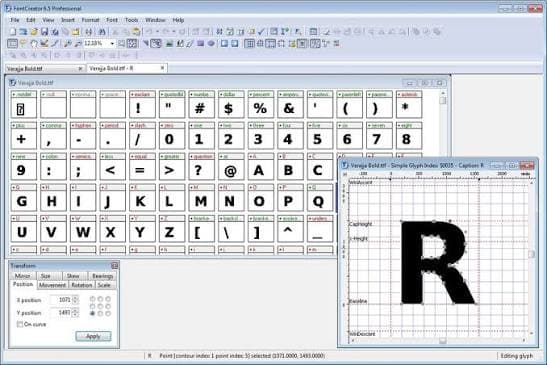
Creating a custom font can give a brand, website, logo, or personal project a unique look. In the past, font design required specialist knowledge and expensive professional tools. Today, font creation software makes the process more accessible.
Font creation software allows designers to create letters, numbers, symbols, and other characters and turn them into usable font files. Depending on the program, users can draw characters from scratch, import artwork, adjust spacing, create different font styles, and export fonts for use on computers and websites.
Whether you want to create a handwritten font, logo font, display typeface, or complete family of fonts, choosing the right software is an important first step.
What Is Font Creation Software?
Font creation software is a program designed to help users create and edit digital fonts.
A typical font creation tool provides an editor where you can design individual characters. You can create letters such as A, B, C, and continue through the alphabet. You can also add numbers, punctuation marks, symbols, and characters for other languages.
The finished design can usually be exported as a font file.
Common font file formats include:
- OTF
- TTF
- WOFF
- WOFF2
The format you need depends on where you plan to use the font.
Why Create Your Own Font?
There are thousands of existing fonts available online, but sometimes they do not match the exact style you want.
Creating your own font gives you more control over the design.
Custom fonts can be useful for:
- Brand identities
- Logos
- Websites
- Mobile apps
- Social media graphics
- Posters
- Invitations
- Packaging
- Digital products
- Personal projects
A custom font can also help create a consistent visual style across different designs.
How Does Font Creation Software Work?
Font creation programs usually work with individual glyphs.
A glyph is the visual representation of a character. For example, the letter "A" is a character, while its specific visual design in a particular font is a glyph.
The basic process is usually:
- Create or import character designs.
- Adjust the shape of each glyph.
- Set character spacing.
- Add additional symbols and characters.
- Test the font.
- Fix design or spacing problems.
- Export the font file.
The exact tools vary between software programs.
Main Features of Font Creation Software
When comparing font creation tools, look at the features they provide.
Glyph Editor
The glyph editor is one of the most important parts of font design software.
It allows you to draw and edit individual characters.
You may be able to work with:
- Curves
- Lines
- Anchor points
- Shapes
- Bézier handles
These tools help create smooth and accurate letterforms.
Font Spacing
Spacing has a major effect on how a font looks.
If letters are too close together, text can become difficult to read. If they are too far apart, the design may look disconnected.
Font creation software lets you control the spacing around individual characters.
Kerning
Kerning adjusts the space between specific pairs of letters.
For example, the combination of "A" and "V" can sometimes look uneven if both letters use the same default spacing.
Kerning allows you to make these combinations look more balanced.
Font Preview
A preview feature lets you see how your font looks in words and sentences.
This is useful because a letter may look good on its own but appear different when placed next to other characters.
OpenType Features
Some advanced font creation programs support OpenType features.
These can allow fonts to include features such as:
- Ligatures
- Alternate characters
- Small caps
- Fractions
- Contextual alternatives
These features are especially useful for professional typography.
Creating a Font From Handwriting
One popular reason people use font creation software is to turn handwriting into a digital font.
The basic process can be simple.
First, write the alphabet and other required characters on paper or a digital tablet.
Then scan or photograph the writing.
The artwork can be cleaned and imported into compatible font software.
Each character is then converted into a glyph and adjusted for spacing.
Finally, the font can be exported for installation and use.
The quality of the final font depends heavily on the original handwriting and the cleanup process.
Font Creation Software for Beginners
Beginners should look for software with a simple interface and helpful tools.
A beginner friendly font editor should make it easy to:
- Draw glyphs
- Import images
- Edit curves
- Set spacing
- Preview text
- Export font files
You do not need to create a complete professional font family for your first project.
Start with a small project, such as a display font containing uppercase letters and numbers. Once you become comfortable with the tools, you can add lowercase letters, punctuation, symbols, and other characters.
Font Creation Software for Professional Designers
Professional type designers may need more advanced features.
These can include:
- Advanced Bézier editing
- Multiple font masters
- Variable fonts
- OpenType scripting
- Automatic spacing
- Kerning tools
- Font validation
- Language support
- Batch editing
- Professional export options
Advanced software can also provide tools for managing large font families.
How to Create a Font Step by Step
Step 1: Decide on the Font Style
Before opening your font software, decide what you want to create.
Your font might be:
- Handwritten
- Serif
- Sans serif
- Script
- Monospace
- Decorative
- Display
- Retro
- Modern
Having a clear style makes the design process easier.
Step 2: Sketch Your Characters
Start by sketching the main letters.
Pay attention to the overall style.
For example, if you are creating a bold display font, the letters should have a consistent visual weight.
Step 3: Create the Glyphs
Open your font creation software and begin creating the characters.
You can draw them directly inside the program or import artwork from another design application.
Step 4: Set the Font Metrics
Font metrics control how characters sit on a line of text.
Important measurements include:
- Baseline
- Cap height
- X height
- Ascender
- Descender
Keeping these measurements consistent helps the font work properly.
Step 5: Adjust Spacing
Test different letters next to one another.
Adjust the side bearings so the letters have balanced spacing.
Step 6: Add Kerning
After setting general spacing, adjust specific letter combinations.
This can improve the appearance of common combinations such as "To", "Ta", "AV", and "WA".
Step 7: Test the Font
Type different words and sentences using your new font.
Look for:
- Uneven spacing
- Inconsistent letter height
- Rough curves
- Missing characters
- Incorrect punctuation
- Poor kerning
Make corrections before exporting.
Step 8: Export the Font
When you are happy with the design, export the font.
Choose the file format based on your intended use.
For desktop applications, TTF or OTF may be appropriate. For websites, WOFF or WOFF2 is commonly used.
Font Creation Software for Logos
Custom fonts can be useful when creating logos.
Instead of using a standard typeface, a designer can modify or create letters specifically for a brand.
This can produce a more distinctive visual identity.
However, a logo does not always need a complete font family. In some cases, designing only a few custom letterforms may be enough.
Font Creation Software for Websites
Web designers can use custom fonts to create a unique website appearance.
Web font files such as WOFF and WOFF2 are commonly used for browser based typography.
Before publishing a font online, make sure you have the legal rights to use all included artwork and that the font license allows web use.
If you create the font yourself, you generally have greater control over how it can be licensed, subject to the applicable laws and any third party assets used during creation.
Free Font Creation Software
There are free font creation tools available for beginners and experienced designers.
Free software can be a good way to learn the basic concepts of font design without paying for professional software immediately.
When evaluating free software, check whether it supports the features you need.
Important questions include:
- Can it export TTF?
- Can it export OTF?
- Does it support kerning?
- Can you import artwork?
- Does it support OpenType features?
- Does it support your required language?
- Is the software still maintained?
Paid Font Creation Software
Paid font software may provide more advanced typography tools.
Professional users may benefit from features such as variable font support, advanced OpenType controls, automated kerning, scripting, and font validation.
However, expensive software is not automatically better for every user.
A beginner creating a simple handwriting font may not need professional features.
Font Creation Software vs. Graphic Design Software
Graphic design software and font creation software serve different purposes.
Graphic design applications are designed for creating images, illustrations, logos, layouts, and other visual content.
Font creation software is designed specifically around typefaces and glyphs.
You can create letter artwork in a graphic design program and then move it into a font editor, depending on the software you use.
This combination can be useful when designing detailed or decorative typefaces.
Common Font Design Mistakes
Inconsistent Letter Shapes
Letters should share a consistent visual style.
If some characters are much heavier or wider than others, the font may look unbalanced.
Poor Spacing
Even well designed letters can look bad when the spacing is incorrect.
Always test complete words instead of judging letters individually.
Ignoring Lowercase Letters
If you plan to create a complete font, lowercase letters require as much attention as uppercase characters.
Missing Symbols
Remember to test punctuation, numbers, and commonly used symbols.
Not Testing Different Sizes
A font may look excellent at a large size but become difficult to read when used at a smaller size.
Test your font at different sizes and in different applications.
How Long Does It Take to Create a Font?
The time required depends on the complexity of the typeface.
A simple handwriting font may take a few hours.
A complete professional font family can take weeks, months, or longer.
A font family may include multiple weights and styles such as:
- Light
- Regular
- Medium
- Bold
- Extra Bold
- Italic
Each additional style requires significant design and testing work.
Can You Sell a Font You Create?
Yes, people can create fonts and sell them, subject to applicable laws and ownership rights.
If every part of the font is your original work, you can generally decide how you want to license it.
However, be careful when using third party images, vector artwork, templates, or existing fonts.
Read the relevant licenses before incorporating external assets into a commercial font.
How to Choose the Best Font Creation Software
The best software depends on your goals.
For beginners, focus on ease of use.
For professional type designers, advanced typography features may be more important.
Before choosing a program, consider:
- Your design experience
- Operating system
- Font formats
- OpenType support
- Variable font support
- Kerning tools
- Import options
- Export options
- Language support
- Price
Try a free trial when available before purchasing professional software.
Frequently Asked Questions
What is font creation software?
Font creation software is a program used to design, edit, test, and export digital fonts.
Can beginners create fonts?
Yes. Beginners can start with simple handwriting or display fonts and learn more advanced techniques over time.
Can I turn my handwriting into a font?
Yes. Many font creation tools can help convert handwriting into digital characters.
What font format should I use?
The best format depends on where the font will be used. TTF and OTF are common desktop formats, while WOFF and WOFF2 are widely used for websites.
Do I need graphic design software?
Not always. Some font editors allow you to create glyphs directly. Graphic design software can still be useful for creating artwork that is later imported into a font editor.
Can I create a font for free?
Yes. Free font creation tools are available, although advanced professional features may require paid software.
Final Thoughts
Font creation software has made custom type design more accessible to designers, businesses, and beginners.
With the right tool, you can create handwriting fonts, display typefaces, logo lettering, web fonts, and complete font families.
Start with a clear design idea and focus on consistent letter shapes, spacing, and readability. Test your font carefully before exporting it.
If you are new to typography, begin with a small project. Once you understand glyphs, spacing, kerning, and font metrics, you can move on to more advanced projects.
The best font creation software is the one that provides the features you need without making the design process unnecessarily difficult.