
September 23, 2026
Clouds PNG: Free Transparent Cloud Images for Design
What Is a Clouds PNG?
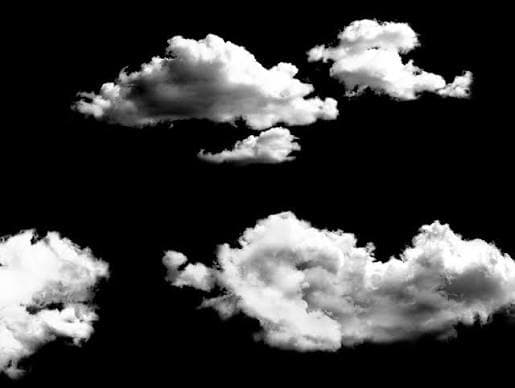
A clouds PNG is a digital image of one or more clouds saved in PNG format. Many cloud PNG images are designed with a transparent background, which makes them useful for graphic design, websites, presentations, posters, social media posts, thumbnails, and photo editing.
Unlike a normal cloud photograph with a solid sky background, a transparent cloud PNG can be placed over another image without showing a large rectangular background around it.
PNG supports transparency through an alpha channel. The alpha value controls how transparent or opaque each pixel is, including partially transparent pixels around soft edges.
This makes PNG a useful format for cloud graphics because clouds usually have soft, fading edges.
Why Use Clouds PNG Images?
Clouds are common design elements because they can add depth, atmosphere, softness, or a natural feeling to an image.
A transparent cloud PNG can be placed over almost any background. You can use a cloud graphic over a blue sky, landscape, illustration, poster, website banner, or video thumbnail.
Some common uses include:
- Website graphics
- YouTube thumbnails
- Social media posts
- Digital artwork
- Photo editing
- Posters
- Invitations
- Presentations
- Children's designs
- Weather graphics
- Game artwork
- Wallpapers
- Advertising graphics
A transparent PNG works especially well when you want the cloud to blend into the existing design instead of appearing inside a rectangular image box.
What Does Transparent Clouds PNG Mean?
A transparent clouds PNG contains cloud pixels while the surrounding area can be transparent.
For example, imagine a cloud image with a blue sky behind it. If the image is saved as a normal JPG, the blue sky remains part of the picture.
With a properly prepared transparent PNG, the sky can be removed while the cloud remains.
You can then place the cloud over a different background.
PNG transparency is stored using alpha information. Fully transparent pixels have no visible content, while partially transparent pixels can create smooth edges.
This is particularly useful for clouds because the edges of real clouds are often soft rather than perfectly sharp.
Types of Clouds PNG
There are many different types of cloud PNG images available for design projects.
White Clouds PNG
White cloud PNG images are among the most useful options.
They can be placed over:
- Blue backgrounds
- Landscapes
- Posters
- Children's artwork
- Website headers
- Illustrations
White clouds can create a clean and simple sky effect.
Realistic Clouds PNG
Realistic clouds PNG images are usually created from photographs or detailed digital artwork.
They can be useful when you want a natural appearance.
Examples include:
Realistic white cloud PNG
Storm cloud PNG
Fluffy cloud PNG
Dark cloud PNG
Cloud formation PNG
These images can be used in photo manipulation and digital artwork.
Cartoon Clouds PNG
Cartoon cloud PNG images have a more illustrated appearance.
They are useful for:
- Children's graphics
- Games
- Educational content
- Stickers
- Social media posts
- Cartoon artwork
- School projects
Cartoon clouds can also be combined with cartoon characters and other transparent PNG elements.
Cloud Clipart PNG
Cloud clipart is usually simpler than realistic cloud photography.
It may contain a basic cloud shape, outline, illustration, or decorative design.
Clipart can be useful when creating:
- Invitations
- Worksheets
- Presentations
- Posters
- Cards
- Website graphics
Cloud Outline PNG
Cloud outline PNG images contain a cloud shape made from lines rather than a realistic photograph.
They can work well for minimalist designs and icons.
Dark Clouds PNG
Dark cloud PNG images can be used to create dramatic scenes.
They are useful for:
- Storm designs
- Weather graphics
- Horror artwork
- Fantasy artwork
- Movie thumbnails
- Dramatic photo edits
Clouds PNG for Photo Editing
Cloud PNG images are popular in photo editing because they can be layered over an existing photograph.
For example, you might have a landscape photograph with a plain sky. A transparent cloud PNG can add extra cloud formations without requiring you to replace the entire sky.
The process is usually simple:
- Open your photograph in an image editor.
- Import the cloud PNG.
- Place it above the background layer.
- Resize the cloud.
- Adjust its position.
- Change opacity if necessary.
- Add additional clouds if needed.
- Export the final image.
Because the cloud has a transparent background, the original image remains visible around it.
Clouds PNG for YouTube Thumbnails
YouTube thumbnails often use strong visual elements to make an image more interesting.
Cloud PNG graphics can be useful for travel, aviation, weather, gaming, children's content, fantasy videos, and many other topics.
For example, you can place a large cloud PNG behind a title.
A thumbnail could contain:
Sky background + clouds PNG + large text + character
The transparent cloud can also be positioned around the edges of the design.
When using several cloud graphics, vary their size and position instead of placing identical clouds in a repeated pattern.
Clouds PNG for Websites
Transparent cloud graphics can also be used on websites.
For example, a website header could contain a landscape background with clouds positioned above it.
Cloud graphics can also be used as decorative elements in:
- Landing pages
- Children's websites
- Weather websites
- Educational websites
- Game websites
- Creative portfolios
However, large PNG files can increase page size. It is a good idea to resize and compress cloud images before uploading them to a website.
How to Choose a Good Clouds PNG
Not every cloud PNG is suitable for every project.
Before downloading an image, check several things.
Check the Background
A genuine transparent PNG should have transparent pixels around the cloud.
Many image editors display transparency as a checkerboard pattern.
The checkerboard itself is not part of a correctly transparent PNG. It is normally a visual indicator used by an editor to show transparent areas.
Check the Image Quality
Look at the image at its intended size.
A small low resolution cloud may look blurry when enlarged.
For posters or large artwork, choose a higher resolution image.
Check the Edges
Look closely around the cloud.
Poorly removed backgrounds can leave white, gray, or dark halos around the edges.
Soft cloud edges can make this problem more noticeable.
Check the License
This is very important when using clouds PNG images for commercial work.
An image being available online does not automatically mean you can use it in a commercial project.
Check the license before using a cloud PNG in:
- Business websites
- Advertisements
- Products
- Client designs
- Printed materials
- Monetized videos
For example, Wikimedia Commons includes cloud PNG files with specific licensing information. One transparent cloud file on Commons is released under CC BY 3.0 and GFDL, which means its particular usage conditions should be followed.
Always check the license of the exact image you download.
Clouds PNG vs JPG
PNG and JPG serve different purposes.
A PNG can contain transparency, while a standard JPG does not provide an alpha channel for transparent pixels.
This makes PNG useful for individual cloud graphics that need to sit over another image.
JPG is often more suitable for photographs where transparency is not required.
For example:
Cloud photograph with sky: JPG can be suitable.
Individual cloud with transparent background: PNG is often more convenient.
The PNG specification supports images with alpha information, including fully transparent and partially transparent pixels.
Clouds PNG vs WebP
WebP can also support transparency and can sometimes provide smaller files for web use.
This makes WebP worth considering when website performance is important.
However, PNG remains a familiar choice for editable graphics, design assets, and workflows where transparent PNG files are specifically expected.
The best format depends on how you plan to use the cloud image.
If you are building a website and need a small web asset, you can compare PNG and WebP file sizes after compression.
If you are sharing a design asset with someone who specifically needs a PNG, keeping the file as PNG may be more convenient.
How to Make a Clouds PNG
You can create your own cloud PNG from a photograph or illustration.
Method 1: Remove the Background
Start with a cloud photograph.
Open it in an image editor and remove the sky or other unwanted background.
Keep the cloud and its soft edges.
Then export the image as PNG with transparency enabled.
Method 2: Use a Background Remover
An automatic background remover can make the process faster.
Upload the cloud image, remove the background, check the edges, and download the transparent PNG.
However, automatic tools may remove parts of a cloud if the cloud and background have similar colors.
Always inspect the result before using it.
Method 3: Create a Digital Cloud
You can also create a cloud illustration from scratch.
Use shapes, brushes, gradients, and transparency to create the desired appearance.
Once finished, export the design as PNG with a transparent background.
How to Edit Clouds PNG
A transparent cloud image can be edited in many image editors.
You can:
- Resize it
- Rotate it
- Flip it
- Change opacity
- Adjust brightness
- Change contrast
- Add shadows
- Blur it
- Change its color
- Duplicate it
- Combine several clouds
For example, reducing opacity can make a cloud look farther away.
Making a cloud larger can make it appear closer to the viewer.
Combining different cloud sizes can create a stronger sense of depth.
How to Create a Realistic Cloud Scene
If you want to build a realistic sky using clouds PNG images, start with the background.
Use a suitable sky or landscape photograph.
Then add larger clouds near the foreground and smaller clouds farther away.
Adjust their opacity and brightness to match the lighting of the original photograph.
You should also consider the direction of light.
If sunlight in the background comes from the left, a cloud with strong highlights on the right may look unnatural.
Small adjustments can make the final composition more believable.
Clouds PNG for Graphic Design
Cloud graphics can be used as decorative elements in many designs.
For example, a designer could create a poster using:
Background color + clouds PNG + text + decorative elements
Clouds can also be used behind logos, illustrations, characters, product graphics, and typography.
Transparent PNG assets make this easier because you can position the graphic without carrying a rectangular background with it.
Clouds PNG for Children's Designs
Clouds are especially common in children's graphics.
They can be used in:
- Story illustrations
- Educational worksheets
- Nursery graphics
- Cartoon scenes
- Children's websites
- Classroom presentations
- Printable activities
Cartoon cloud PNG images can be combined with suns, stars, rainbows, birds, balloons, and other transparent graphics.
Clouds PNG for Presentations
Cloud PNG images can also be used in PowerPoint and other presentation software.
For example, a presentation about weather could use transparent cloud graphics around diagrams and text.
Because the background is transparent, you can place the cloud over a slide background without creating a visible rectangular box.
Keep decorative elements small enough that they do not distract from the main information.
Common Problems With Clouds PNG
White Box Around the Cloud
This usually means the background was not actually removed.
You may have a JPG or a PNG with a white background rather than a transparent PNG.
White Halo
A white or light outline can appear around a cloud when its original background was removed poorly.
This can be especially visible against a dark background.
Jagged Edges
Low quality background removal can produce rough edges.
Using a higher resolution source and refining the mask can help.
Large File Size
A high resolution PNG can be much larger than a compressed web image.
Resize the cloud to the actual size needed and compress it when appropriate.
Poor Quality After Enlargement
Increasing a small PNG to a very large size can make it blurry.
Start with a sufficiently high resolution image whenever possible.
How to Optimize a Clouds PNG for a Website
If you plan to use cloud PNG graphics on a website, keep performance in mind.
First, determine the actual display size.
There is little benefit in uploading a huge cloud image if it will only appear at a small size.
You can then resize the image and compress it.
Also consider whether WebP would be suitable for your website.
A useful workflow is:
Original image → remove background → resize → compress → upload
Keep the original file separately in case you need to make changes later.
Where to Find Clouds PNG Images
Cloud PNG images can be found on many types of websites, including:
- Free image libraries
- Stock image websites
- Design asset websites
- Open source media libraries
- Graphic resource websites
- PNG resource websites
When searching, use specific terms.
For example:
clouds PNG
cloud PNG transparent
white cloud PNG
realistic cloud PNG
cartoon cloud PNG
clouds transparent background
storm cloud PNG
fluffy cloud PNG
More specific searches can help you find an image that matches your project.
How to Search for the Right Cloud PNG
Instead of searching only for "clouds PNG," describe the image you need.
For example, if you need a realistic white cloud with a transparent background, search for:
realistic white clouds PNG transparent
If you need cartoon graphics:
cartoon clouds PNG transparent
If you need dramatic clouds:
dark storm clouds PNG transparent
Adding words such as "transparent," "high resolution," "realistic," or "cartoon" can make your search more specific.
Frequently Asked Questions
What is a clouds PNG?
A clouds PNG is a PNG image containing cloud graphics. Many are created with transparent backgrounds so they can be placed over other images and designs.
Are clouds PNG images transparent?
Some are and some are not. Check the actual file before downloading. A PNG file can support transparency, but the PNG format itself does not guarantee that every file has a transparent background.
Can I use a clouds PNG commercially?
It depends on the license of the individual image. Always check the usage rights before using an image commercially.
Can I put a cloud PNG over a photo?
Yes. A transparent cloud PNG can be layered over a photograph in an image editor.
Can I edit a clouds PNG?
Yes. You can resize, rotate, recolor, duplicate, crop, or adjust the opacity of a cloud PNG in compatible image editing software.
Why does my transparent PNG show a white background?
The file may not actually contain transparency, or the image may have been exported with a white background. Check the file in an image editor that displays transparency.
Is PNG better than JPG for transparent clouds?
PNG is generally more convenient when you need transparency because PNG supports alpha information. JPG does not provide the same type of transparent alpha channel.
Conclusion
Clouds PNG images are useful design assets for websites, photo editing, social media graphics, presentations, posters, videos, thumbnails, and digital artwork.
The main advantage of a transparent cloud PNG is flexibility. You can place the cloud over different backgrounds without carrying a large rectangular sky image with it.
When choosing a cloud PNG, check the transparency, resolution, edge quality, file size, and license. For websites, resize and compress the image before uploading when appropriate. For professional and commercial projects, always verify that the image license allows your intended use.
Whether you need realistic clouds, cartoon clouds, white clouds, storm clouds, or simple cloud clipart, a properly prepared PNG can be a useful addition to your design collection.