
September 6, 2026
How to Copy & Paste Fancy Text on iPhone & Android in 2026
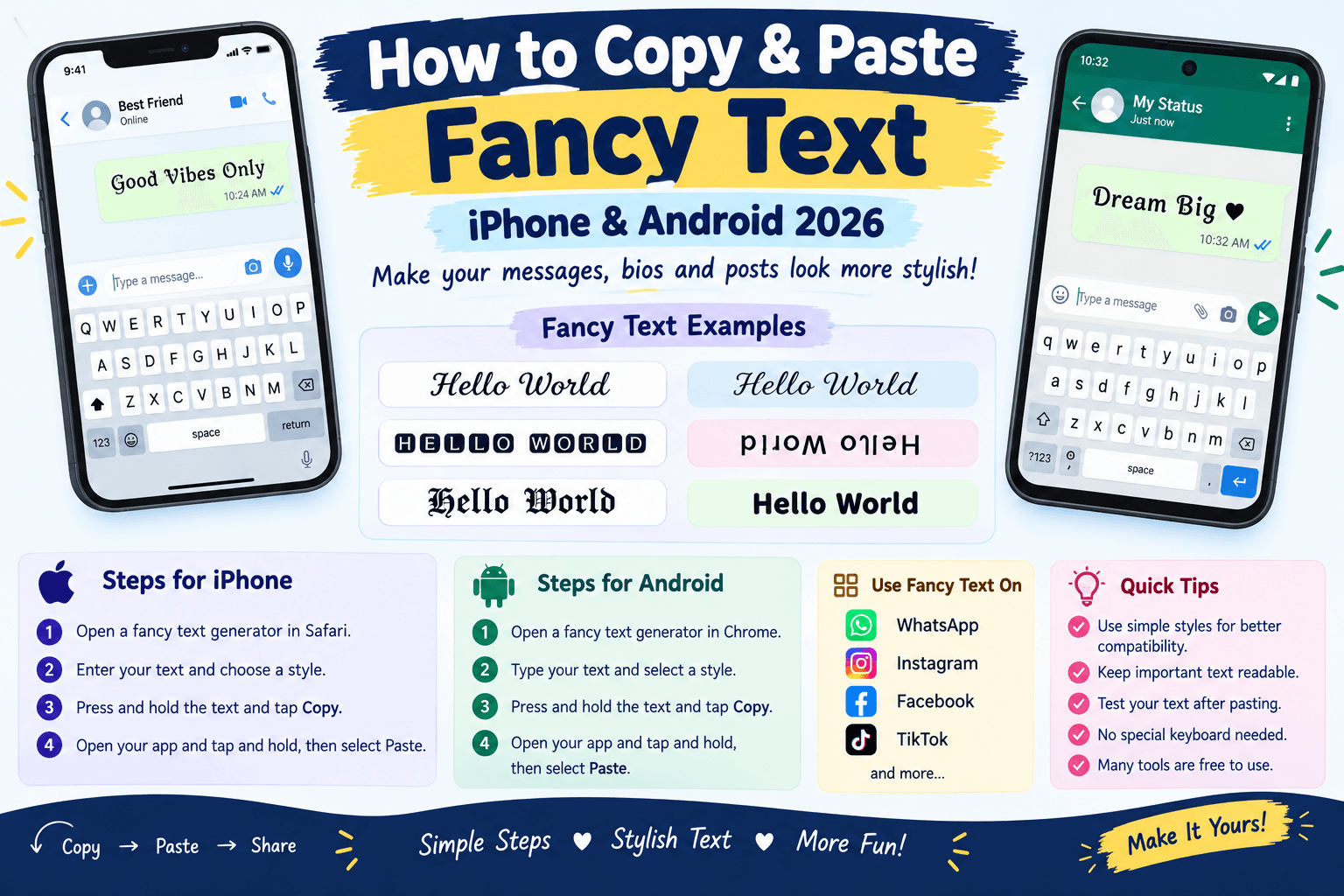
Fancy text is an easy way to make your messages, social media posts, and profiles look more interesting. You can use stylish letters, symbols, bold looking characters, cursive text, and other Unicode styles without installing a new font on your phone.
In 2026, both iPhone and Android users can copy and paste fancy text into many popular apps. The process is simple. You create or find the fancy text, copy it, open the app where you want to use it, and paste it.
This guide explains exactly how to copy and paste fancy text on iPhone and Android, along with tips for using it on Instagram, WhatsApp, Facebook, TikTok, and other platforms.
What Is Fancy Text?
Fancy text is text created with special Unicode characters that look different from standard letters.
For example, normal text might look like:
Hello Friends
A fancy version could look like:
𝓗𝓮𝓵𝓵𝓸 𝓕𝓻𝓲𝓮𝓷𝓭𝓼
Another style could look like:
𝐇𝐞𝐥𝐥𝐨 𝐅𝐫𝐢𝐞𝐧𝐝𝐬
These characters are generally treated as text rather than images. This makes them easy to copy and paste into many apps.
How to Copy and Paste Fancy Text on iPhone
Copying fancy text on an iPhone is very easy.
Step 1: Create Your Fancy Text
Open a fancy text or font generator in Safari. Enter the word, name, or sentence you want to change.
For example, enter:
Welcome to my profile
The generator will show several different styles.
Step 2: Choose a Style
Look through the available styles and choose the one you like.
You might find styles such as:
𝑾𝒆𝒍𝒄𝒐𝒎𝒆
𝓦𝓮𝓵𝓬𝓸𝓶𝓮
𝗪𝗲𝗹𝗰𝗼𝗺𝗲
𝕎𝕖𝕝𝕔𝕠𝕞𝕖
Step 3: Copy the Text
Press and hold the fancy text.
The iPhone selection menu will appear. Tap Copy.
Your fancy text is now stored on the iPhone clipboard.
Step 4: Open the App
Open the app where you want to use the text.
You can paste fancy text into many places, including social media posts, messages, comments, and profile fields.
Step 5: Paste the Text
Tap inside the text box and press and hold.
When the menu appears, tap Paste.
Your fancy text should appear in the text field.
How to Copy and Paste Fancy Text on Android
The process on Android is also simple.
Step 1: Generate Fancy Text
Open your preferred fancy text generator using Chrome or another browser.
Type your normal text into the input box.
Step 2: Select Your Favorite Style
Choose a font style from the generated results.
You can try several styles before deciding which one looks best.
Step 3: Copy the Fancy Text
Tap and hold the generated text.
Select Copy from the menu.
On some Android phones, you may first need to select the text before tapping Copy.
Step 4: Open Your App
Open WhatsApp, Instagram, Facebook, TikTok, Messenger, or another app.
Go to the place where you want to add your fancy text.
Step 5: Paste
Tap and hold inside the text field.
Select Paste.
The fancy text will appear in the box.
How to Copy Fancy Text From This Website
If you are using a website that provides fancy fonts, the process is even easier.
First, type your text into the generator. Browse the available styles and find one you like. Then use the copy button provided next to the style.
After copying the text, open your preferred app and paste it into the required field.
You do not need to download a font file for most Unicode based fancy text styles.
How to Use Fancy Text on WhatsApp
WhatsApp users often use fancy text for messages, statuses, group names, and profile information.
To use fancy text:
- Create your text with a fancy text generator.
- Tap the Copy button.
- Open WhatsApp.
- Open a chat or status editor.
- Tap and hold inside the text field.
- Select Paste.
- Send or publish your text.
For example, instead of writing:
Good Morning Everyone
you could paste:
𝓖𝓸𝓸𝓭 𝓜𝓸𝓻𝓷𝓲𝓷𝓰 𝓔𝓿𝓮𝓻𝔂𝓸𝓷𝓮
This can make a simple message look more decorative.
How to Copy and Paste Fancy Text on Instagram
Fancy text can also be useful on Instagram.
You can use it in places such as:
- Instagram bio
- Captions
- Comments
- Direct messages
- Profile information
Create the text with a generator, copy it, open Instagram, and paste it into the desired field.
Keep your bio readable. Using too many unusual characters can make your profile harder for people to understand.
How to Use Fancy Text on Facebook
Facebook supports many Unicode characters, so you can often paste fancy text into posts and comments.
For example, you could use a fancy style for a short heading and normal text for the rest of your post.
This gives your content some visual variety without turning the entire post into decorative text.
How to Copy Fancy Text for TikTok
TikTok users can use fancy text in profile information, captions, comments, and other supported text fields.
The process is the same:
Create → Copy → Open TikTok → Paste
Some characters may not display correctly on every device, so check your text after pasting it.
How to Copy Fancy Text From One App to Another
You can copy fancy text from almost any location where it can be selected.
For example, you might find fancy text in a website, message, social media post, or note.
Press and hold the text, select it, and tap Copy. Then open another application, press and hold the text field, and select Paste.
This is one of the easiest ways to move fancy text between apps.
Does Fancy Text Require a Special Keyboard?
Usually, no.
Most fancy text generators work by converting standard letters into Unicode characters. You can create the text in your browser and then paste it using your normal iPhone or Android keyboard.
This means you do not have to install a special keyboard just to use many fancy text styles.
Does Fancy Text Work Without Installing Fonts?
In most cases, yes.
Unicode based fancy text does not work like a traditional font file. Instead, it uses different Unicode characters that are already supported by many devices and applications.
That is why you can copy the text from a website and paste it into another application.
However, compatibility depends on the app and device.
Why Is My Fancy Text Not Showing Correctly?
Sometimes fancy characters do not display as expected.
You may see empty boxes, question marks, or different looking characters. This usually happens because the application or device does not support a particular Unicode character.
If this happens, try another style with simpler characters.
A basic bold or italic Unicode style is often more compatible than a highly decorative style.
Can I Copy Fancy Text From a Computer to My Phone?
Yes.
If you create fancy text on a computer, you can move it to your phone in several ways.
You can send the text to yourself through a messaging app, email, cloud notes, or another service. Then copy the text on your phone and paste it into your preferred application.
You can also simply open the same fancy text generator on your phone and create the text there.
Can I Use Fancy Text in My Username?
Some websites, social networks, and games allow Unicode characters in usernames or display names.
However, each platform has its own rules. Some allow special characters, while others only accept standard letters, numbers, and selected symbols.
If a fancy username does not work, try a simpler style.
Is Fancy Text Free?
Many online fancy text generators are free.
You can usually enter your text, select a style, copy the result, and paste it into another application without paying for anything.
Some websites may offer additional features, but basic fancy text conversion is widely available for free.
Tips for Using Fancy Text on Your Phone
Fancy text is most effective when you use it carefully.
Keep important information readable. Decorative characters can be harder to understand.
Test your text. Check how it looks after pasting it into the app.
Try different styles. Some styles work better on certain devices.
Avoid excessive decoration. A small amount of fancy text can look better than an entire paragraph.
Use simple styles for names. Very unusual characters may cause compatibility problems.
Frequently Asked Questions
How do I copy fancy text on iPhone?
Press and hold the fancy text, select it, and tap Copy. Then open another app, press and hold inside the text field, and select Paste.
How do I copy fancy text on Android?
Press and hold the fancy text and choose Copy. Open the app where you want to use it, press and hold inside the text box, and tap Paste.
Can I paste fancy text into WhatsApp?
Yes. Many Unicode based fancy text styles can be copied and pasted into WhatsApp messages and other supported areas.
Can I use fancy text on Instagram?
Yes. Many fancy Unicode characters can be used in Instagram bios, captions, comments, and messages.
Do I need to install a fancy font?
Usually, no. Many online fancy text tools use Unicode characters, so you can copy and paste the result using your normal keyboard.
Why does my fancy text look different on another phone?
Different devices and applications may use different fonts to display Unicode characters. As a result, some fancy characters can look slightly different.
Can I copy fancy text from a website?
Yes. Press and hold the text, select Copy, and then paste it into the application where you want to use it.
Final Thoughts
Copying and pasting fancy text on iPhone and Android is a quick way to make your online content more creative. You can create stylish text in a browser, copy it with a simple tap, and paste it into WhatsApp, Instagram, Facebook, TikTok, messages, bios, and other supported apps.
You usually do not need a special keyboard or font installation. A Unicode based fancy text generator can do the conversion for you.
For the best results, choose styles that are easy to read and supported by the platform you are using. Try different fonts, copy your favorite style, and give your messages and profiles a fresh look in 2026.